
Download Linux Foundation : CKS Questions & Answers as PDF & Test Software

Updated: Nov 17, 2026
No. of Questions: 66 Questions & Answers with Testing Engine
Download Limit: Unlimited
Reliable & Actual Study Materials for CKS Exam Success
Our Online Test Engine & Self Test Software of TestSimulate CKS actual study materials can simulate the exam scene so that you will have a good command of writing speed and time. Then multiple practices make you perfect while in the real Linux Foundation CKS exam. The package practice version will not only provide you high-quality CKS exam preparation materials but also various studying ways.
100% Money Back Guarantee
TestSimulate has an unprecedented 99.6% first time pass rate among our customers.  We're so confident of our products that we provide no hassle product exchange.
- Best exam practice material
- Three formats are optional
- 10 years of excellence
- 365 Days Free Updates
- Learn anywhere, anytime
- 100% Safe shopping experience
- Instant Download: Our system will send you the products you purchase in mailbox in a minute after payment. (If not received within 12 hours, please contact us. Note: don't forget to check your spam.)
CKS Online Engine

- Online Tool, Convenient, easy to study.
- Instant Online Access
- Supports All Web Browsers
- Practice Online Anytime
- Test History and Performance Review
- Supports Windows / Mac / Android / iOS, etc.
- Try Online Engine Demo
CKS Self Test Engine

- Installable Software Application
- Simulates Real Exam Environment
- Builds CKS Exam Confidence
- Supports MS Operating System
- Two Modes For Practice
- Practice Offline Anytime
- Software Screenshots
CKS Practice Q&A's

- Printable CKS PDF Format
- Prepared by CKS Experts
- Instant Access to Download
- Study Anywhere, Anytime
- 365 Days Free Updates
- Free CKS PDF Demo Available
- Download Q&A's Demo
Linux Foundation CKS Exam Overview:
| Certification Vendor: | Linux Foundation |
|---|---|
| Exam Name: | Certified Kubernetes Security Specialist (CKS) Exam |
| Exam Number: | CKS |
| Exam Price: | USD 395 |
| Related Certifications: | Certified Kubernetes Administrator (CKA) Certified Kubernetes Application Developer (CKAD) |
| Exam Format: | Performance-based exam, Hands-on lab (Kubernetes environment), Terminal-based tasks |
| Exam Duration: | 120 minutes |
| Available Languages: | English |
| Real Exam Qty: | Performance-based tasks (no fixed number) |
| Passing Score: | Not publicly disclosed |
| Certificate Validity Period: | 2 years |
| Recommended Training: | Kubernetes Security Essentials (Linux Foundation Training) CKS Exam Preparation Course |
| Exam Registration: | Linux Foundation Candidate Handbook Linux Foundation Certification Page |
| Sample Questions: | Linux Foundation CKS Sample Questions |
| Exam Way: | Online, proctored, remote performance-based exam |
| Pre Condition: | Valid Certified Kubernetes Administrator (CKA) certification is required |
| Official Syllabus URL: | https://training.linuxfoundation.org/certification/certified-kubernetes-security-specialist/ |
Linux Foundation CKS Exam Syllabus Topics:
| Topic | Details |
|---|---|
| Topic 1 |
|
| Topic 2 |
|
| Topic 3 |
|
Reference: https://training.linuxfoundation.org/certification/certified-kubernetes-security-specialist/#exams
Linux Foundation Certified Kubernetes Security Specialist (CKS) Sample Questions:
SIMULATION
Documentation Secrets, TLS Secrets, Volumes
You must connect to the correct host . Failure to do so may result in a zero score.
[candidate@base] $ ssh cks000m40
Path
Key
Context
You must complete securing access to a web server using SSL files stored in a TLS Secret .
Task
Create a TLS Secret named clever-cactus in the clever-cactus namespace for an existing Deployment named clever-cactus.
Use the following SSL files:
File
Certificate /home/candidate/clever-cactus/web.k8s.local.crt
/home/candidate/clever-cactus/web.k8s.local.key
The Deployment is already configured to use the TLS Secret.
Do not modify the existing Deployment.
Failure to do so may result in a reduced score.
Correct Answer:
See the Explanation below for complete solution
Explanation:
1) Connect to the correct host
ssh cks000m40
sudo -i
export KUBECONFIG=/etc/kubernetes/admin.conf
2) Verify namespace exists (quick check)
kubectl get ns clever-cactus
3) Verify certificate and key files exist
ls -l /home/candidate/clever-cactus/web.k8s.local.crt
ls -l /home/candidate/clever-cactus/web.k8s.local.key
Both files must exist.
4) Create the TLS Secret (THIS IS THE MAIN TASK)
Create a TLS Secret named clever-cactus in namespace clever-cactus:
kubectl -n clever-cactus create secret tls clever-cactus \
--cert=/home/candidate/clever-cactus/web.k8s.local.crt \
--key=/home/candidate/clever-cactus/web.k8s.local.key
Do NOT use apply
Do NOT edit the Deployment
5) Verify the Secret
kubectl -n clever-cactus get secret clever-cactus
Expected type:
kubernetes.io/tls
Optional detail check:
kubectl -n clever-cactus describe secret clever-cactus
You should see:
tls.crt
tls.key
6) (Optional) Confirm Pods are running
Since the Deployment is already configured to use the Secret, Pods should now work.
kubectl -n clever-cactus get pods
SIMULATION
A container image scanner is set up on the cluster.
Given an incomplete configuration in the directory
/etc/kubernetes/confcontrol and a functional container image scanner with HTTPS endpoint https://test-server.local.8081/image_policy
1. Enable the admission plugin.
2. Validate the control configuration and change it to implicit deny.
Finally, test the configuration by deploying the pod having the image tag as latest.
Correct Answer:
SeetheExplanationbelowExplanation:
ssh-add ~/.ssh/tempprivate
eval "$(ssh-agent -s)"
cd contrib/terraform/aws
vi terraform.tfvars
terraform init
terraform apply -var-file=credentials.tfvars
ansible-playbook -i ./inventory/hosts ./cluster.yml -e ansible_ssh_user=core -e bootstrap_os=coreos -b --become-user=root --flush-cache -e ansible_user=core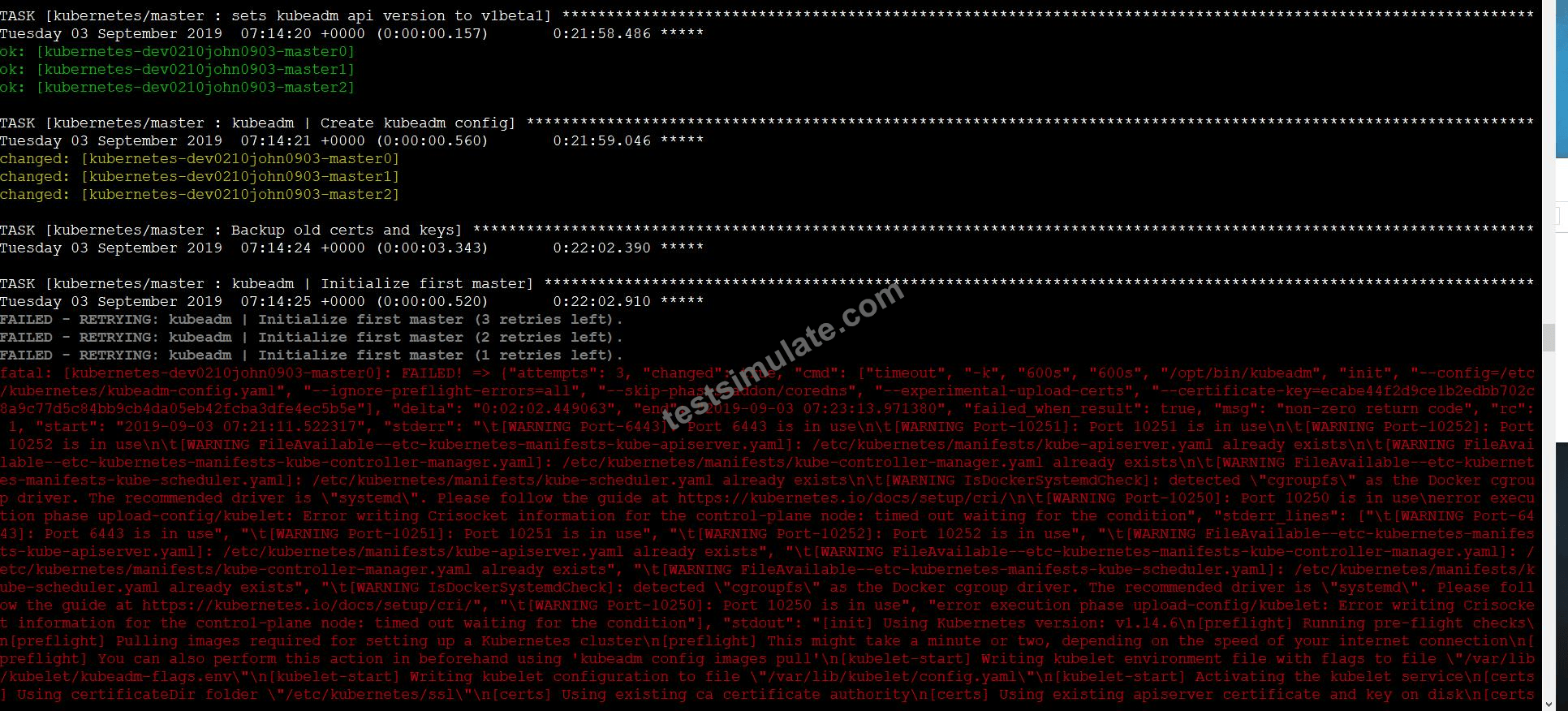
SIMULATION
Documentation Upgrading kubeadm clusters
You must connect to the correct host . Failure to do so may result in a zero score.
[candidate@base] $ ssh cks000034
Context
The kubeadm provisioned cluster was recently upgraded, leaving one node on a slightly older version due to workload compatibility concerns.
Task
Upgrade the cluster node compute-0 to match the version of the control plane node.
Use a command like the following to connect to the compute node:
[candidate@cks000034] $ ssh compute-0
Do not modify any running workloads in the cluster.
Do not forget to exit from the compute node once you have completed your tasks:
[candidate@icompute-e] $ exit
Correct Answer:
See the Explanation below for complete solution
Explanation:
Below is the CKS / CKA exam-style, exact step-by-step solution for Upgrading a kubeadm worker node.
Follow in order, type exact commands, no extra actions.
QUESTION - Upgrade node compute-0 (EXAM MODE)
1) Connect to the correct host (control plane)
ssh cks000034
sudo -i
export KUBECONFIG=/etc/kubernetes/admin.conf
2) Identify the control plane Kubernetes version
This is the target version for compute-0.
kubectl get nodes
Example output:
NAME STATUS ROLES VERSION
control-plane Ready control-plane v1.27.4
compute-0 Ready <none> v1.26.6
Note the control-plane version
Example: v1.27.4
3) Drain the compute node (do NOT modify workloads manually)
kubectl drain compute-0 --ignore-daemonsets --delete-emptydir-data
Wait until drain completes successfully.
4) SSH into the compute node
ssh compute-0
sudo -i
5) Check current kubeadm version on compute node
kubeadm version
6) Upgrade kubeadm to match control plane version
Replace 1.27.4 with the exact control-plane version you observed.
apt-get update
apt-get install -y kubeadm=1.27.4-00
Verify:
kubeadm version
7) Run kubeadm upgrade for the node
kubeadm upgrade node
✅ This updates node-specific configs (NO workloads touched).
8) Upgrade kubelet and kubectl to the same version
apt-get install -y kubelet=1.27.4-00 kubectl=1.27.4-00
9) Restart kubelet
systemctl daemon-reload
systemctl restart kubelet
systemctl status kubelet --no-pager
10) Exit the compute node (IMPORTANT)
exit
11) Uncordon the compute node (back on control plane)
kubectl uncordon compute-0
12) Final verification
kubectl get nodes
Expected:
NAME STATUS VERSION
compute-0 Ready v1.27.4
SIMULATION
You can switch the cluster/configuration context using the following command:
[desk@cli] $ kubectl config use-context test-account
Task: Enable audit logs in the cluster.
To do so, enable the log backend, and ensure that:
1. logs are stored at /var/log/Kubernetes/logs.txt
2. log files are retained for 5 days
3. at maximum, a number of 10 old audit log files are retained
A basic policy is provided at /etc/Kubernetes/logpolicy/audit-policy.yaml. It only specifies what not to log.
Note: The base policy is located on the cluster's master node.
Edit and extend the basic policy to log:
1. Nodes changes at RequestResponse level
2. The request body of persistentvolumes changes in the namespace frontend
3. ConfigMap and Secret changes in all namespaces at the Metadata level Also, add a catch-all rule to log all other requests at the Metadata level Note: Don't forget to apply the modified policy.
Correct Answer:
See the Explanation belowExplanation:
$ vim /etc/kubernetes/log-policy/audit-policy.yaml
- level: RequestResponse
userGroups: ["system:nodes"]
- level: Request
resources:
- group: "" # core API group
resources: ["persistentvolumes"]
namespaces: ["frontend"]
- level: Metadata
resources:
- group: ""
resources: ["configmaps", "secrets"]
- level: Metadata
$ vim /etc/kubernetes/manifests/kube-apiserver.yaml
Add these
- --audit-policy-file=/etc/kubernetes/log-policy/audit-policy.yaml
- --audit-log-path=/var/log/kubernetes/logs.txt
- --audit-log-maxage=5
- --audit-log-maxbackup=10
Explanation:
[desk@cli] $ ssh master1
[master1@cli] $ vim /etc/kubernetes/log-policy/audit-policy.yaml
apiVersion: audit.k8s.io/v1 # This is required.
kind: Policy
# Don't generate audit events for all requests in RequestReceived stage.
omitStages:
- "RequestReceived"
rules:
# Don't log watch requests by the "system:kube-proxy" on endpoints or services
- level: None
users: ["system:kube-proxy"]
verbs: ["watch"]
resources:
- group: "" # core API group
resources: ["endpoints", "services"]
# Don't log authenticated requests to certain non-resource URL paths.
- level: None
userGroups: ["system:authenticated"]
nonResourceURLs:
- "/api*" # Wildcard matching.
- "/version"
# Add your changes below
- level: RequestResponse
userGroups: ["system:nodes"] # Block for nodes
- level: Request
resources:
- group: "" # core API group
resources: ["persistentvolumes"] # Block for persistentvolumes
namespaces: ["frontend"] # Block for persistentvolumes of frontend ns
- level: Metadata
resources:
- group: "" # core API group
resources: ["configmaps", "secrets"] # Block for configmaps & secrets
- level: Metadata # Block for everything else
[master1@cli] $ vim /etc/kubernetes/manifests/kube-apiserver.yaml
apiVersion: v1
kind: Pod
metadata:
annotations:
kubeadm.kubernetes.io/kube-apiserver.advertise-address.endpoint: 10.0.0.5:6443 labels:
component: kube-apiserver
tier: control-plane
name: kube-apiserver
namespace: kube-system
spec:
containers:
- command:
- kube-apiserver
- --advertise-address=10.0.0.5
- --allow-privileged=true
- --authorization-mode=Node,RBAC
- --audit-policy-file=/etc/kubernetes/log-policy/audit-policy.yaml #Add this
- --audit-log-path=/var/log/kubernetes/logs.txt #Add this
- --audit-log-maxage=5 #Add this
- --audit-log-maxbackup=10 #Add this
...
output truncated
Note: log volume & policy volume is already mounted in vim /etc/kubernetes/manifests/kube-apiserver.yaml so no need to mount it.
SIMULATION
Secrets stored in the etcd is not secure at rest, you can use the etcdctl command utility to find the secret value for e.g:- ETCDCTL_API=3 etcdctl get /registry/secrets/default/cks-secret --cacert="ca.crt" --cert="server.crt" --key="server.key" Output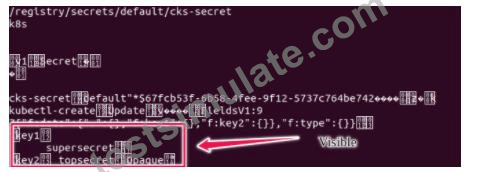
Using the Encryption Configuration, Create the manifest, which secures the resource secrets using the provider AES-CBC and identity, to encrypt the secret-data at rest and ensure all secrets are encrypted with the new configuration.
Correct Answer:
See the Explanation belowExplanation:
ETCD secret encryption can be verified with the help of etcdctl command line utility.
ETCD secrets are stored at the path /registry/secrets/$namespace/$secret on the master node.
The below command can be used to verify if the particular ETCD secret is encrypted or not.
# ETCDCTL_API=3 etcdctl get /registry/secrets/default/secret1 [...] | hexdump -C
Viewing page 1 out of 14 pages.
Viewing questions 1-5 out of 66 questions.
This is a great CKS study guide. It's very helpful to the CKS exam. Also, it is a good learning material as well. I believe you will pass for sure as long as you use it!
 By Earl
I haved attended to my CKS exam last week and passed. Guys this CKS exam study material is really amazing and second to none for providing results.
By Gregary
Thank you for your help! Your CKS exam dumps are easy-understanding. I just used your study guide for my CKS examination and passed it with a high score. So proud!
By Jerry
I want to share the TestSimulate with you guys, hope you will get a good result in test as well. The CKS exam dumps are really helpful!
By Marcus
I have Experience but i always afraid to go this CKS exam. But with the help of CKS TestSimulate questions, it just a piece of cake. Thanks!
By Harlan
I thought I would take the CKS exam more than twice. This CKS exam dumps is very great and i passed so easily. You gays should buy it too!
By Joyce
Disclaimer Policy: The site does not guarantee the content of the comments. Because of the different time and the changes in the scope of the exam, it can produce different effect. Before you purchase the dump, please carefully read the product introduction from the page. In addition, please be advised the site will not be responsible for the content of the comments and contradictions between users.

TestSimulate CKS practice test engine provide users the most accurate exam materials so that users can have a good learning about your exam. Most examinees choose our practice test engine as their only exam materials and pass exam successfully. Our high-quality CKS practice test engine should be helpful for every user if you pay attention on our exam questions. Every penny will be worth.
Or if you are afraid, we have money back guarantee policy that if you fail exam after purchasing our CKS practice test engine, we will full refund to you soon if you send us your failure score scanned and apply for refund. No Pass, Full Refund!
Frequently Asked Questions
Are your materials surely helpful and latest?
Yes, our CKS exam questions are certainly helpful practice materials. Our pass rate is 99%. Our CKS exam questions are compiled strictly. Our education experts are experienced in this line many years. We guarantee that our materials are helpful and latest surely. If you want to know more about our products, you can download our PDF free demo for reference. Also we have pictures and illustration for Self Test Software & Online Engine version.
When do your products update? How often do our CKS exam products change?
All our products are the latest version. If you want to know details about each exam materials, our service will be waiting for you 7*24*365 online. Our exam products will updates with the change of the real CKS test. It is different for each exam code.
How long will my CKS exam materials be valid after purchase?
All our products can share 365 days free download for updating version from the date of purchase. So don't worry. The exam materials will be valid for 365 days on our site.
How can I know if you release new version? How can I download the updating version?
We have professional system designed by our strict IT staff. Once the CKS exam materials you purchased have new updates, our system will send you a mail to notify you including the downloading link automatically, or you can log in our site via account and password, and then download any time. As we all know, procedure may be more accurate than manpower.
Should I need to register an account on your site?
No. After purchase, our system will set up an account and password by your purchasing information. You can use it directly or you can change your password as you like. No need to register an account yourself.
Do you have money back policy? How can I get refund if fail?
Yes, we have money back guarantee if you fail exam with our products. Applying for refund is simple that you send email to us for applying refund attached your failure score scanned. Money will be back to what you pay. Normally we support Credit Card for most countries. Our refund validity is 60 days from the date of your purchase. Our customer service is 365 days warranty. Users can receive our latest materials within one year.
What is the Self Test Software? How to use it? How about Online Test Engine?
Self Test Software should be downloaded and installed in Window system with Java script. After purchase, we will send you email including download link, you click the link and download directly. If your computer is not the Window system and Java script, you can choose to purchase Online Test Engine. It is available for all device such Mac.
Can I purchase PDF files? Can I print out?
Yes, you can choose PDF version and print out. PDF version, Self Test Software and Online Test Engine cover same questions and answers. PDF version is printable.
How many computers can Self Test Software be downloaded? How about Online Test Engine?
Self Test Software can be downloaded in more than two hundreds computers. It is no limitation for the quantity of computers. So does Online Test Engine. You can use Online Test Engine in any device.
Over 74352+ Satisfied Customers


